2012年4月16日 星期一

Aliasing generating normal map from height map

I'm doing bump mapping with webGL shaders. Everything was fine until I was generating normal map from the height map. I generated the height map with another shader and rendered it as a texture. Then read the texture (heigh map) and generate normal map from it with the way described in this thread
http://stackoverflow.com/questions/5281261/generating-a-normal-map-from-a-height-map

The normal map looks fine except it has pretty serious aliasing problem!


The aliasing problem should come from the size of the texture doesn't match the canvas's size but since The texture came from the previous rendering, they should have the same size. And the texture parameters were set with gl.NEAREST (turn off the mipmap) and gl.CLAMP_TO_EDGE (turn off the repeating) so even it's not power of two, it should be alright. The offset in the shader is like [1.0/canvas.width, 1.0/canvas.height]

Could anyone have any idea what causes the aliasing? Thank you so much,

Yi

2011年10月10日 星期一

[WebGL] Pass an array into fragment shader

At this moment (10/10/2011) is impossible!!

I wanna do multiple light sources so I have to pass a series of locations. The only way to do it now is to use texture. At this moment, webGL does support floating-point texture but my graphics card however doesn't. Here is the link to see if your card supports it (www.kludx.com/opengl_versions.php)

Here is the code to move your data into the texture:

var pix = [];
for from i=0 to n
{
for from j=0 to n
{
var x=...
var y=...
var z=...
pix.push(x,y,z);
}
}

Where n is the size of your array. I've searched on the internet, saying that using 2D array is better than 1D either performance is better or some of the hardware doesn't support 1D texture. So if you want a 1D array just use nx1 2D texture.

Here is the code you set up the texture:

texture = gl.createTexture();
gl.activeTexture(gl.TEXTURE0);
gl.bindTexture(gl.TEXTURE_2D, texture);
gl.pixelStorei(gl.UNPACK_ALIGNMENT,1);
gl.texImage2D(gl.TEXTURE_2D, 0, gl.RGB, 32, 32, 0, gl.RGB, gl.FLOAT, new Float32Array(pix));
gl.texParameteri(gl.TEXTURE_2D, gl.TEXTURE_MAG_FILTER, gl.NEAREST); gl.texParameteri(gl.TEXTURE_2D, gl.TEXTURE_MIN_FILTER, gl.NEAREST);

However, if your card doesn't support floating-point texture (like mine,) you have to use fixed point texture.
gl.texImage2D(gl.TEXTURE_2D, 0, gl.RGB, 32, 32, 0, gl.RGB, gl.UNSIGNED_BYTE, newUint8Array(pix));

And then you can set up the shader parameters and access the texture like the normal image textures.

[Ignore this part if you can use floating-point texture]
If you only can use fixed point texture. The input value will be automatically scaled from [0,255] to [0,1]. So you will lose some precision and also you will have a fixed range of data. If you want to have data in [-100,100], All you have to do is to scale to [0,255], get [0,1] in the shader and then scale back to [-100,100]

2011年10月6日 星期四

Project Journal 10/06 [Multiple Light Sources]

[Finished]
1. Part of the scene graph. Now it can add transform groups, and models. Besides, it can change the model matrices under the transform groups.
2. Model loading: The model hierarchy is Scene->Transform Group->Model->Mesh.
A Scene can contain several Transform Group.
A Transform Group can have other transform groups and Models.
A Model will contain several meshes that compose of ONE entire model.
A Mesh is where the real vertices locate. A complicated model might have several meshes object.

[To do]
1. Multiple Light Sources:
I just found out that in webGL, pixel shader doesn't support uniform array indexing which means you can pass an array into the shader but only the vertex shader can access it.
So to do multiple light sources, the only way is to use texture.

Quote:
http://www.khronos.org/registry/webgl/specs/latest/#DYNAMIC_INDEXING_OF_ARRAYS "WebGL only allows dynamic indexing with constant expressions, loop indices or a combination. The only exception is for uniform access in vertex shaders, which can be indexed using any expression."

2011年10月4日 星期二

Work Journal 10/04

[Finished]
1. Place of indication selection system. (Interactively select the place you want to highlight)

[Bug]
1. The mini lights don't work along with global light sources.
2. Some selected place don't have light emitted there.

2011年10月3日 星期一

Project Journal 10/03

[Finished]
1. I've finished the new model loading mechanism. I use the utf8 model format from the google group. It works pretty good.
2. New scene management utilities are installed named "spidergl." It provides the basic animation like function: load, update, draw.

[To Do list]
Since I've changed pretty much the whole architecture, there are many things need to be fixed.

1. A strong aliasing shows up in the model.
2. Lighting.
3. Scene control (like where to add lights and where to add new objects.)
4. Draw functions.

2011年10月1日 星期六

Project Journal 10/01

[Finished]
1. Per pixel shading
2. OOP design

[To DO List]
1. Scene graph
2. Model importing
3. Multiple light sources

Nice website for normal matrix

When importing an object, both the vertices and normals are defined in Object Space. However, in the shader, if we want to do the calculation in camera space, we multiply the vertex with the Model View Matrix (M) to make it from object space to world space but we multiply (M^-1)^T
with the normal to make it from object space to world.

This article is pretty clear why there is the difference.

2011年9月29日 星期四

Work Journal 9/29

I embedded the light under 1 unit along the normal direction under the surface. The outcome should be several disk light sources embedded under the mesh.

[To Do]
1. Control the scattering and absorption and the intensity of the light.
2. Fix the brain mesh.
3. Test several light sources


2011年9月27日 星期二

Work Journal 9/27

I have tried several ways to make to media glows from the inside but not too transparent. However, if I set the scattering and absorption rate too high, the light can't come out.

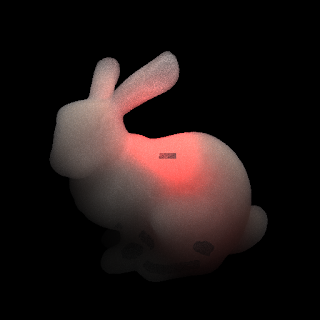
[Bunny Model]


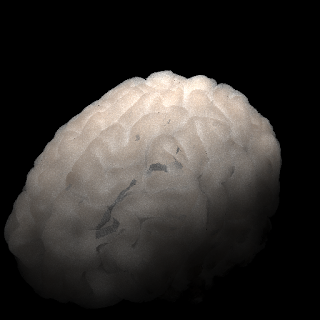
[Brain Model with External Lighting]


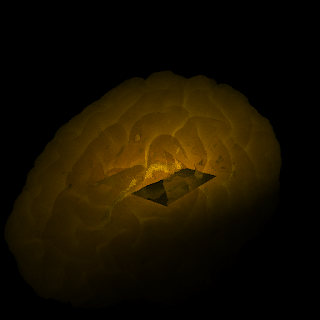
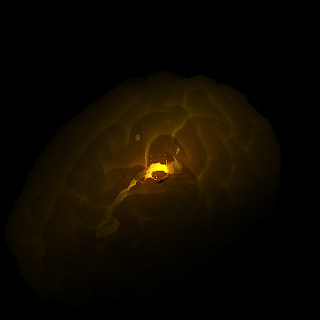
[Brain Model with Internal Lighting]


[To do Next]
*a bug when I place the square light inside. (Didn't occur when using the bunny model.)


* Find out a proper parameter to see as a light in fog.

2011年9月26日 星期一

Work Journal 9/26

[Might be problematic]
BVH (if too many triangles or the objects are scattered everywhere, it might be a problem)
Photon mapping (due to the limit of the memory, if too many photons are used, it will crash)

[Finish Today]
The "Media" object now is fully controllable.
High scattering, high absorption will result in close to diffuse objects.
Low scattering, low absorption will give more translucency.

[Next goal]
Multiple light sources inside the object.
I'm not sure how it will look like. I will set the scattering and absorption low to make the light from inside can go out.
No clue if it will look like the wax object in the reference picture.

One more thing, set the reflection to white might be working without global tone mapping.

2011年6月26日 星期日

[Parallel Computing] Sorting

I adopted the odd even sort for sorting on GPU. I use NVIDIA GeForece 9400M, which has the spec (only list related):
CUDA capability 1.1:
1. Max number of threads per block: 512
2. Max blocks in x direction of a grid: 512
3. Shared memory size: 16K
4. Global memory size: 256M

For my application:
Each item in the list: 16 bytes
Usually the size of the list is larger than 1024.

In my implementation, a thread is assigned with two elements in the list. A block containing maximum number of threads (512) can manage 1024 items. In my implementation, the whole list doesn't fit in one block, and inside a block, the elements don't fit in the shared memory. Therefore, I had to use multiple blocks (usually 30~60 blocks) to accomodate the list. Unfortunately, CUDA only provides with us thread synchronization within a block. For interblock synchronization, I have no choice to relaunch the kernel multiple times.


Result:
Sorting 438270 items
CPU version: 86s (This version is not optimized, just want to verify the correctness of GPU version)
GPU version: 504ms

2011年6月22日 星期三

[Parallel Computing] Indexing tricks

When making device kernels (shaders,) how to assign threads to some tasks is very important.
Since the GPU has really little support of recursion, how to turn your recursive program into a non-recursive one becomes very important as well.

I saw this approach when I was working on GPU sorting.
The original Odd Even Merge Sort is described here

I'm not gonna describe the iterative version in detail but mention some tricks to accustom your code to the GPU kernel.

1. When your code has the thread assignment with a circular pattern:
For example:
8 Threads:
Thread Id 0 1 2 3 4 5 6 7
Activate/no n n y y n n y y

Solution:
Here we have a circular pattern with a period of 4.
Of course we can use something like if(Idx.x==xxx), but if the case is making an iterative execution, there will be too many cases to be considered.
A better way is to use (Idx & (period-1)) and set a threshold.
In our example, we can use (Idx&3) and set a threshold equal to 2.
So the values become:

Thread Id 0 1 2 3 4 5 6 7
Activate/no n n y y n n y y
Value 0 1 2 3 0 1 2 3
Thresholded n n y y n n y y

So it's exactly what we want for our program.

2010年8月2日 星期一

[Feature]Photon Mapping

I use photon mapping to do the indirect illumination. Indeed, it's way faster than path tracing.Following image is rendered with global photon map and caustic photon map.

[Cornell Box]
Parameters:1000 samples direct lighting
10000 photons
1000 photons for irradiance estimation


Parameters:1000 samples direct lighting
10000 photons
1000 photons for irradiance estimation


Parameters:
2000 samples direct lighting
1500x1500 HDR image as background
10000 photons
1000 photons for irradiance estimation


2010年7月21日 星期三

[Path Tracing]Environment Mapping

After adding environment mapping, everything looks good ^^.

Path tracing isn't a good method to do caustic, so it's noisy for the caustic even though I use comparably more samples.

Parameters:
700 samples path tracing
1500x1500 HDR image as background


Image based Lighting
Parameters:
700 samples path tracing
50 samples image based lighting
1500x1500 HDR image as background


Image based Lighting
Parameters:
1500 samples path tracing
50 samples image based lighting
1500x1500 HDR image as background


2010年7月15日 星期四

[Progress]Path Tracing

After I review the whole concept about path tracing, now I'm more aware of it.

1. Original path tracing doesn't separate direct illumination part from indirect illumination part.

2. Direct illumination part is for smoothing the result. (Because if the sampled ray doesn't hit the luminaire, it'll be totally black and otherwise it'll be really bright.)

Here is the result. Path tracing with a glass ball.

Parameters:
1 shadow ray
1 hemisphere sample
15 times max bounce (if none of bounces hits the light)
200 samples per pixel


2010年7月1日 星期四

[Progress]BVH with SSE

Finally I finish my BVH with SSE implementation, but the outcome for a simple model (66454 triangles) doesn't seem like helpful.

Here is the outcome:

Without SSE
==BVH Info==
1-element leaf: 1838
2-element leaf: 18209
3-element leaf: 2876
4-element leaf: 2811
Total: 27047 bounding boxes
Building time: 2.453573 sec
==Rendering Info==
Rendering time: 1.565233 sec
Ray-Box intersection: 19658128
Ray-Triangle intersection: 1393575

With SSE
==BVH Info==
1-element leaf: 0
2-element leaf: 1
3-element leaf: 0
4-element leaf: 16613
Total: 16614 bounding boxes
Building time: 2.569810 sec
==Rendering Info==
Rendering time: 1.429016 sec
Ray-Box intersection: 19821888
Ray-Triangle intersection: 673405

Two weeks for 0.1 sec improvement. Cool!!

BVH(dark blue lines) for Sponza model


Rendered Image

2010年6月29日 星期二

[Note]VTK InputConnection

My final solution is to use vtkFixedPointVolumeMapper to map the 4-channel data input into the 4-channel renderable volume.

//==following is perhaps wrong guessing==

According to my experiment, the latest version (>5.0) vtk supports 3 channel color transfer function in the class "vtkVolumeProperty". Question is that it seems like no matter how many components are input (I input a 4-component data, and I checked it's still 4-component data after read by the reader), the mapper(vtkVolumeMapper) will merge the 4 component as one. I checked the source code of vtkVolumeMapper.cxx. I think it's very likely it's done at

vtkImageData *Input = vtkImageData::SafeDownCast(genericInput);//it might lose the four channels here when it down casts to vtkImageData.

and the following

this->setInputConnection(0, input);//then it pass the merged data to the 0 port (first port).

It might be the reason that the 3-channeled color transfer function doesn't work.

[Progress]Aligned Memory allocation

For now, I use _mm_load_ps to load the data into __m128 datatype. Somehow I don't face the problem that needs to use _mm_malloc() to specify 16-bit aligned memory allocation, but I haven't done yet, so maybe there's some problem not yet found.

This time I do overload the operator and save lots of redundancy code which makes the code more understandable (even though in practice, it's not faster.)

Hope I can finish the BVH with SSE tomorrow.

2010年6月28日 星期一

[Progress]BVH with AABB

I finished two version of BVH, but they're mostly the same.
Here is the basic program flow:

For each BVH node (including the root)
Initial the BVH node (find max and min corner)
Sort with three axises and find the best gap to separate into two child nodes.
(using surface area to find the best event)

If I set the initial cost value to infinity then all leaf node will contain only one element.
But if I set it as a value that evaluate by the ray-box intersection cost and ray-triangle intersection cost, then the leaf node might contain more than one element, but however, if your parameters are correct, it might have better performance.

For SSE implementation, the BVH node "MUST" be 4-element leaf or the performance will be compromised. So I also implement a version that every node (except the leftmost or rightmost one for the case that the number is not multiple of 4) contains exactly 4 elements. It's not hard to implement but must be careful considering both two situations (put the remains in the left or right.)

2010年6月24日 星期四

Trick for releasing memory for C++ vector

For C++ vector, there's a huge problem that when you use either clear() or erase(), it won't release the memory for you. And there is "NO" direct way doing so. I searched on the internet and find one trick does that by using swap(). Here is the sample code by Tiyano (a student from Taiwan) explaining how it works.

#include
#include
using std::vector;
int main(void) {
vector A, B;
vector *C;
A.resize(1000);
printf("%d %d\n", A.size(), A.capacity());
A.clear();
printf("%d %d\n", A.size(), A.capacity());
A = B;
printf("%d %d\n", A.size(), A.capacity());
A.swap(B);
printf("%d %d\n", A.size(), A.capacity());
C = new vector;
C->resize(1000);
printf("%d %d\n", C->size(), C->capacity());
delete C;
C = new vector;
printf("%d %d\n", C->size(), C->capacity());
return 0;
}

The second method (new and delete) I'm not 100% sure it works, cuz in my case, the elements are pointers, so I adopt the first method which works.